-
Twitch chat harassment remains unaddressed despite complaints and evidence of potential fraud
CW: sexual content and obscene language will be displayed in this Medium story as well as the accompanying report.
This is a blog post for a report I have written (titled “The ineffectiveness of Twitch with respect to serial harassers and the consequences therein”) Twitch’s shortcomings on addressing harassment from chat. If you’re interested in reading the report in its entirety (it is long), it is available at the end of this post.
One of the outlets that I found during the pandemic which helped me was getting more involved with being a streamer on Twitch. I’ve had an account on the service since 2014, when Twitch Plays Pokémon debuted, but after my partner and a close friend both suggested I start to stream and speedrun, I found myself immersed in the culture that the site has.
Naturally, when harassment claims became front and centre in mid-2020, the arms of Twitch were twisted enough to finally address them. While the verdict is still out on how effective they’ve been since, the focus has primarily been on streamers’ sexual behaviour towards other streamers and their audience.
This has been all well and good, but while streamers often hold the majority of power while they are off and on screen, there is an aspect Twitch has overlooked and outright ignored: the audience.
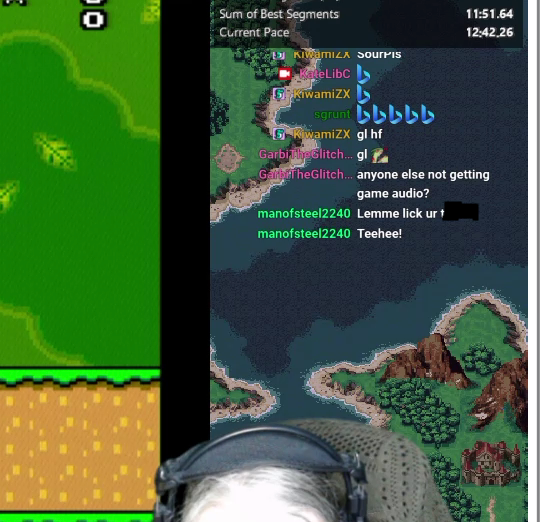
Crop from a Twitch stream of mine where an individual came into chat to post something sexually obscene.
Twitch encourages community participation and provides tools which third-parties rely on to enable this in the video stream. Most common are displaying alongside the main content are the ongoing chat, events such as subscriptions or new followers, and in some cases even manipulating aspects of the game being played on stream. However, this participation comes as a double-edged sword.
While these interactions may drive traffic to the streamer and in turn potential revenue (many streamers rely on Twitch as their main source of income — this author does not and has no intention to do so, but has received money from streaming on the service), it may also provide an avenue for harassment.
It would be easy to say that removing audience participation could lessen the impact of harassment, but Twitch again makes it apparent that this aspect is important and even allows someone to obtain a refund for their subscription should the streamer not meet their expectations.
The audience harassment problem has on the surface remained unaddressed by Twitch for years. This has been further compounded by their legal team demanding any tools used to help coordinate moderation across multiple channels discontinue operating, with examples being OverRustle and Root Online.
When users complain to the company directly about problematic users, there is nary a response from on social media or via their own public support portal.
Should one try and follow the process Twitch provides, the solution is documented in such a way that resembles an infinite loop or you have to rely on third parties or a skillset not possessed by many, which of course is hampered by the chilling effect produced by the company’s terms of service.
The lacking response, the chilling effect by their legal team, and the lacklustre tools provided make Twitch’s remarks about “taking action against [harassment]” on social media ring hollow.
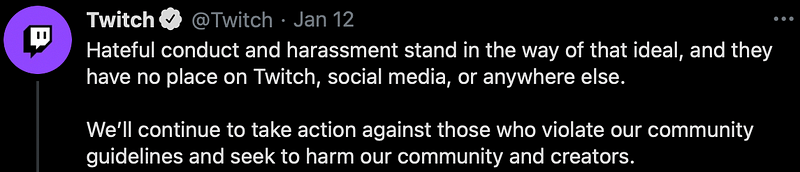
Tweet from January 12, 2021 where Twitch discusses its new harassment policy.
One problematic user often cited (referred to as MoS) when discussing chat harassment became present to me mid-way through 2020. After seeing them a number of times in friends’ streams and then eventually my own, I became interested in who they are and why they were so capable of being prolific across the service.
They first came to attention of Twitch streamers around 2017, but shortly before the pandemic hit in 2020, their behaviour intensified to the point where they registered well over a thousand accounts by the end of the year — data shows there were approximately 1,200 registrations, but in the year prior (2019) only had around 380. It was determined that these accounts and all of their behaviour is likely being performed by hand.
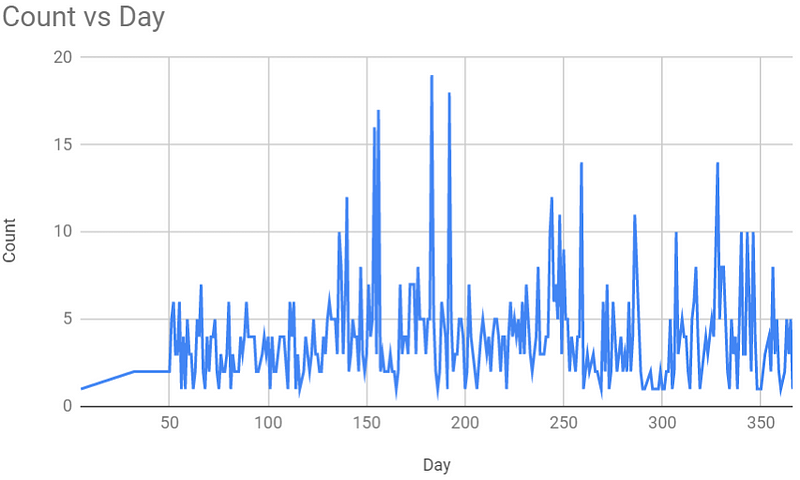
New accounts created by MoS on Twitch throughout 2020.
What became apparent through investigating the actions of MoS was that the process of becoming a Twitch user had a much lower bar than Twitter, which itself has been the constant source of news with respect to large numbers of accounts created to manipulate elections and public health.
Twitch’s inaction combined with the low bar to create accounts is likely enabling fraud and that may undermine their partner and affiliate programs.

Sample of offerings from “BigFollows”, a service which can provide you with inflated numbers of viewers, followers, and most concerning, subscribers. This service is spammed heavily in Twitch chats.
The ease of signing up for Twitch has enabled the ability for services to exist where you can pay to not only have additional followers, but “active” viewers (where you can pay a fee to have a larger viewer count for a period of time) and most curiously, new subscribers at a fraction of what would cost to pay directly to Twitch.
These services rely on the ease of account creation on Twitch which is the same ease that permits harassment by the likes of MoS and many more.
In one such example, using PayPal or cryptocurrency, you can purchase yourself or another streamer 50 additional subscribers for $70 USD, which is 28% of the price of what would have been spent if bought via Twitch themselves (approximately $250 USD).
Twitch does not openly offer bulk discounts for subscriptions — even if they did, it is unlikely to be at such a steep discount.
Based on my professional experience, it is likely that these subscriptions are fraudulently acquired using stolen credit cards or via gift cards acquired by scams. These subscriptions have to be attached to accounts in order for them to apply to the streamer.
Should someone inorganically wish to make partner, allowing them to earn more money from Twitch and have more prominence in attracting more viewers, meeting some of the more difficult requirements could be achieved by spending $200 to acquire the necessary subscribers and followers.
If this seems outlandish and improbable, there are bots which have made partner status — it is not my opinion that any examples shown or any accounts mentioned by me did so by the aforementioned means.
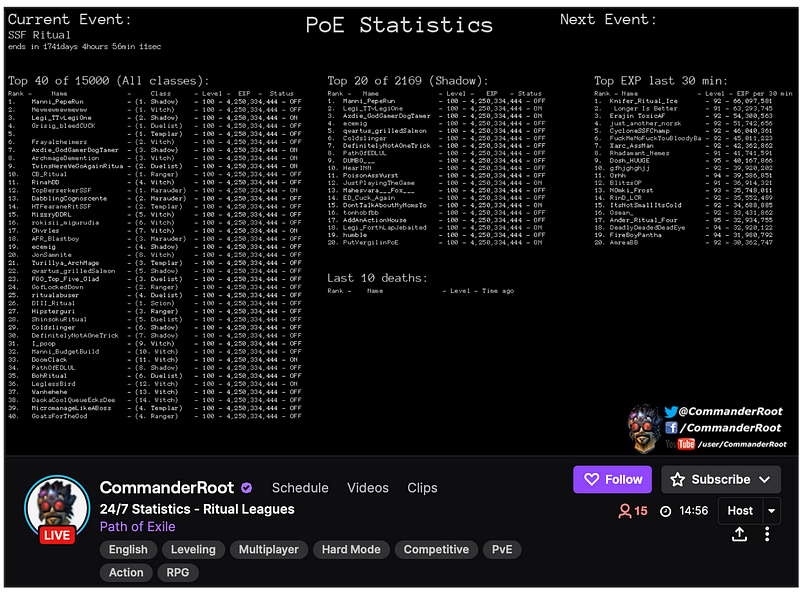
Twitch account “CommanderRoot” displaying statistics about users playing a game, with a purple-coloured checkmark next to their name on the bottom-right, indicating their partner status. Their account’s sole purpose is to idle in other people’s streams and collect data and nothing more with an obnoxious message delivered via Twitch’s moderation appeal system should you ban them.
Twitch’s continued silence on addressing harassments may continue. Though, I have hope that by pointing out the suspected fraud, the company will examine its account creation process and in turn make the bar to engage in such harassment significantly higher.
Increasing the difficulty of creating new accounts on the service could be a start towards making the site better for streamers and the audience alike.
However, I sincerely hope that this does not translate into making becoming partner more difficult for those who deserve and earned it.
If you’re interested in reading about this problem in detail, a PDF is available which outlines the issues in detail, where Twitch falls short, potential mitigations for streamers, details on who MoS might be, and much more.
This document is written as if this were a consulting gig by myself (I allocate time for pro-bono/subsidized work each month and have details about this service in the document) and should be treated as such due to the density of the material.
Download the PDF (5.4 MB)
As this document may be subject to revisions and is the copyright of me, do not share this on a public service (such as Scribd for example) and instead link to this blog post — I will enforce this as necessary.
-
An explanation for TransLink’s ransomware story and recommendations for those who live in Vancouver
If you want to skip the explanation, scroll to the bottom for what I suggest on what you should do next. This is also haphazardly written so ignore the typos and grammatical errors you find here.
I am a computer security professional who has worked in the field for over a decade and the story about TransLink finding itself subject to ransomware is not a new story to me nor is it an overly sophisticated attack. The unfortunate reality is that the transit agency fell subject to an attack that has become more common over the past few years in both the public and private sector as the tactic is fairly effective to unprepared organizations.
The idea that this is a “sophisticated new type of ransomware attack” is a bit exaggerating as this has happened repeatedly for years. A famous example includes local Seth Rogan’s movie, The Interview leading to North Korea breaching Sony Pictures and dumping out their data after having disabled their entire computer network [1]. Combine this tactic with ransomware [2], and you can hold hostage an entire organization until you receive an payout.
What is new is that this has become a popular business for organized crime, typically from abroad. When I say that this is being run as a business, they are engaging in negotiations through customer service [3]. The first instance of ransomware being used to run a business dates back to 1989 where you were required to send at least US$189 via mail to have your hard drive unlocked [4].
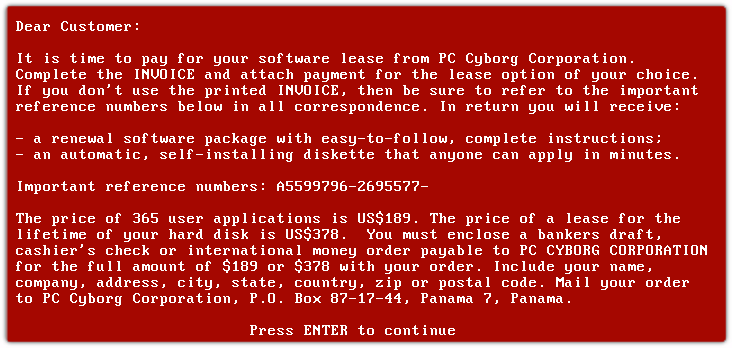
An example of the 1989 AIDS virus, which required you to pay to unlock your computer.
TransLink was also not alone this past week as an American retailer was also subjected to the same malware by the same group [5]. The malware in itself appeared earlier in the fall of this year, but it only picked up from where another group left off [6]. Additionally, Montreal’s transit agency found itself subject to a similar attack in October [7] as did a hospital in the city too [8].
So while “new” is correct when talking about the malware or group itself, the methodology is not new and only a few years younger than I am old. The attacks are via e-mail and while you can do your best to filter things out, you cannot expect that everyone is going to be perfect and someone somewhere is going to click a link. Anti-virus and other software cannot prevent this behaviour and it won’t always detect that someone gave their password to a website that looks legitimate despite it being not their own.
The main concerns you should have for TransLink in all of this are two:
- How is their payment processor handling this?
- How far did they get into TransLink’s systems?
The second one to me is the most important as the first one is actually the least troubling situation.
In the statement, it is mentioned that TransLink does not store fare payment data. If the agency is following industry standards for handling payment, this is likely the case.
What is often the case especially since TransLink uses a third-party to handle payment via credit and debit is that when you have something like an auto-reload on to your Compass card, the agency only knows your credit card number for a brief period until they get a token from their processor. This brief period is often barely a second and that token is strictly for them to use when trying to process your card for that initial payment and any subsequent payments later on.
If someone were to steal those tokens, without them knowing how the payment processor created them they will never be able to get the details about your card. The payment processor themselves likely doesn’t know the card either and instead follows whatever Visa, MasterCard, or American Express tells them to send transactions later on [9].
However, this doesn’t mean that the attackers could not have gotten your payment details when in transit during that time they were in contact with the payment processor. If you have in the past few months changed your payment details on the Compass portal, pay extra special attention to your credit card statement just in case.
Details TransLink does have about you personally if you used the Compass portal include your name, address, what cards you possess, trip history, your e-mail address, and your password. That password should be changed if you haven’t changed it already and if it is the same as your e-mail, not only should that password be changed too but it shouldn’t match what you just changed your Compass account to
Personally, changing your password and having to keep an eye on your credit card statement is the least worrying thing. My next concern is this: how far did they get into the network?
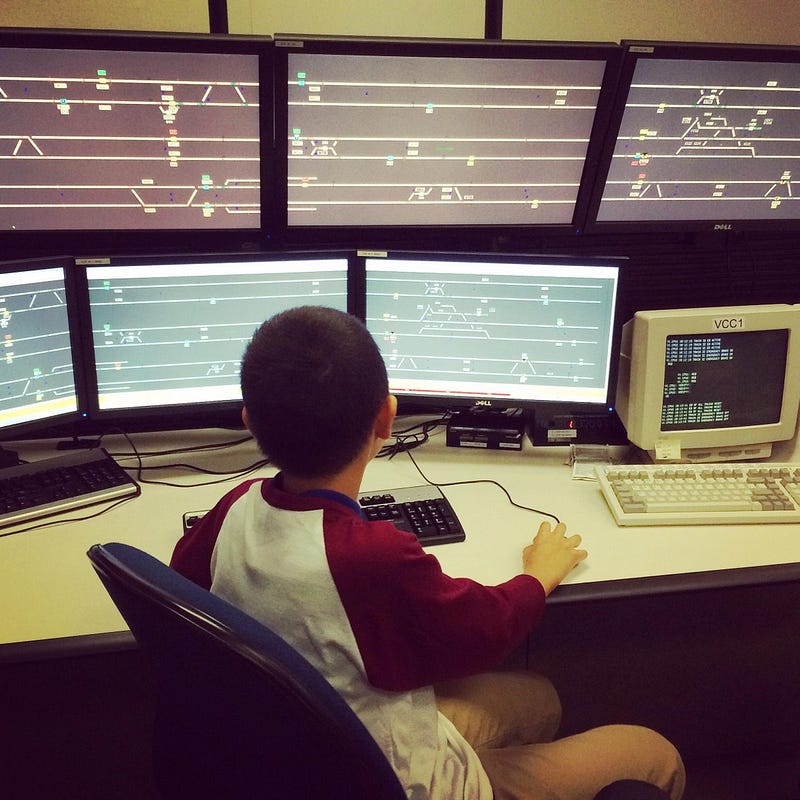
Child in front of a workstation at SkyTrain control (TransLink)
My daily work involves security with industrial control. Industrial control (sometimes called “SCADA”) is just a fancy way of describing physical, moving equipment that is controlled by computers. These things can include power plants, traffic lights, heating and cooling systems, and of course transportation systems. With SkyTrain being fully automated, it is to me an industrial control system of which is super fascinating and have written about before [10].
Problems with the computers operating SkyTrain are an ongoing phenomenon [11]. It is easy to suggest that the problem has to do with the aging computers [12], but unlike the corporate world where desktops and servers are refreshed every few years and the personal world where you may opt to get a new computer as soon as the power cord goes, the industrial control world doesn’t have that luxury as the devices have to work in a state for years because their task is to be reliable and not disrupted. As a result, they’re not cheap [13], so replacing them is often discouraged as they’re usually designed to be extensible not for just a decade but sometimes up to half-a-century.
However, being that they’re old, they’re likely susceptible to tampering. We have had many instances where they’ve taken out power plants, HVAC systems, and power plants to name just a few [14].
My concerns are really this:
- Can TransLink verify that their control systems were not reached?
- How can TransLink verify this and assuage my fears?
- What did the attackers specifically get access to?
Being that the attackers had printed the ransom message on their multi-function printers, they did have network access to the business network, but without any further information all I can assume is that they have this aspect under control.
These sort of breaches are really painful and I hope that TransLink’s cyber security team is able to get a weekend to relax. Having had a few incidents that ate up weeks of my life in the past, I know what they’re experiencing and they have my sympathies.
As for me, I will be requesting a copy of the report they get from whichever security outfit they hire.
What are my recommendations for you?
- Change your password on your Compass Card account. Use a password manager and don’t reuse the same password everywhere. If your password for Compass is the same as your e-mail address, change that too.
- If you have provided a new credit card via that website in the past three months, pay extra attention to your statements
- Keep an eye on any future recommendations from TransLink with respect to your payment card details
If you have any questions, feel free to ping me on Twitter. I do not work for TransLink so I cannot speak for them if you want to know more specifics.
- https://www.vox.com/2015/1/20/18089084/sony-hack-north-korea
- https://www.kaspersky.com/resource-center/definitions/what-is-ransomware
- https://www.wired.com/story/ransomware-gone-corporate-darkside-where-will-it-end/
- https://en.wikipedia.org/wiki/AIDS_(Trojan_horse)
- https://threatpost.com/kmart-egregor-ransomware/161881/
- https://www.digitalshadows.com/blog-and-research/a-eulogy-for-maze-the-end-of-a-ransomware-era/
- https://globalnews.ca/news/7431526/hacker-montreal-transit-cyberattack-seeks-ransom/
- https://globalnews.ca/news/7430000/cyberattack-montreal-health-centre-information-system-shutdown/
- https://squareup.com/ca/en/townsquare/what-does-tokenization-actually-mean
- https://twitter.com/katelibc/status/1014573115244929024
- https://www.burnabynow.com/local-news/update-burnaby-skytrain-back-in-service-after-glitch-3117083
- https://www.citynews1130.com/2014/08/05/translink-gives-tour-of-skytrain-computer-room/
- https://bc.ctvnews.ca/backup-computer-system-for-skytrain-would-cost-20-million-1.1920852
- https://www.osti.gov/servlets/purl/1505628
-
The state of streaming on macOS in 2020
Earlier this year, my partner encouraged me to get into streaming on Twitch after noticing that I spend a lot of time watching others and I myself having a substantial collection of games. When the COVID-19 pandemic began to take a foothold in British Columbia, I found that streaming was an appropriate outlet for me to engage in social activities without having to worry about needing to social distance.
I am a life-long Mac user. I’ve been using Macs on and off since childhood, but since leaving grade school I’ve always had one available to me. I’ve been through the transition from 680x0 to PowerPC, the transition from PowerPC to Intel, and likely will buy the first Mac that makes use of the ARM architecture. macOS is an operating system I prefer to use because it gives me the ability to have an operating system that provides me with a *nix environment all the while giving me enterprise-level tools that I use day-to-day.
Macs are expensive though. The lowest-end desktop model is $999 CAD for a Mac Mini and the base-model Macbook Air is $1,299 CAD. Even with my discount I get through my employer, these machines do not come spec’d with anything on par with what you’d get if you built a PC for the same price. You are paying for the privilege of using an arguably well-built operating system, and combined with the privacy features that Apple touts, you don’t become an advertising target at the same time.
Where does Twitch streaming come in? While I do have Steam installed on my Mac, I don’t in fact play any games on it minus a handful. Most of the games I play are console-based with an old PC set aside for playing any games I still wish to play. My console games are primarily on the Super Nintendo and Sega Genesis, but I do stream from my Nintendo Switch too.
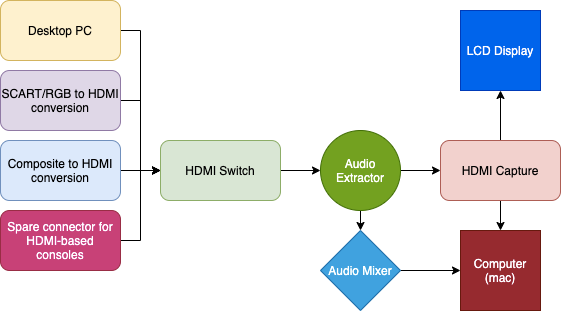
Four HDMI sources passing through various devices before reaching my computer and display.
The above setup is based on a lot of headaches I’ve had with capturing content from my devices to my computer. I like the setup physically as with three buttons and a single connection, I can have my stream live in OBS (Open Broadcaster Software) with little effort. However, to get it to this point has required a lot more effort than would have been required if I were using Windows and even Linux.
Performance on macOS is abysmal. A thread on OBS’ support forums shows a number of shared complaints about using a Mac with OBS: it really pushes the limit of the hardware due to limitations in macOS. This is not the fault of the hardware specifically but rather how macOS has effectively abandoned OpenGL in favour of Metal. This decision means that a Mac made in 2013 has more or less the same performance when capturing video and live-streaming it as a Mac made in 2018, that being my Mac Mini with a six-core i5 and 32 GB of RAM.
If one were to boot their newer model Mac into Windows, they’d not run into these problems. In fact, without having to add an external GPU, the performance would be night and day but then you’re dealing with a computer that is spec’d no better than a Dell laptop that is half the price and includes input devices and a display.
The 2018 Mac Mini does have the option of using the Apple VT hardware encoder, which provides h264 encoding via an interface with Intel QuickSync, but that means you’re sacrificing one of your CPU cores to video encoding. There is no option to make use of NVidia’s NVENC or AMD’s VCE, both of which would off-load to the GPU, because macOS doesn’t provide any level of support for those features.
Basically this means that you cannot use an external GPU to speed things along. You are stuck with CPU-based video encoding.
This also means that buying an iMac Pro or a Mac Pro with a Xeon processor will not be helpful from a cost-perspective as you’re still going to have CPU-based video encoding and you’re still going to have to spend unnecessary amounts of money for such little gain in performance.
Compounding this is the fact that streaming anything from the computer itself is problematic. Performance suffers greatly when you do a window capture versus full-screen, meaning that you run the risk of exposing information you may not want to share. Window capturing means that the frame rate from the software is cut to less than half — it’s that bad and this only started with changes to the graphics sublayer to the operating system a few versions ago.
The short answer you’re probably looking for here is that don’t bother streaming from your Mac if you have any intention of using it for anything else in parallel. You should not mix audio from it, you should not run any heavy applications alongside OBS (such as browsers or anything Electron-based), and you should not expect to stream your own games from it.
OBS cannot help us any further than they have because the operating system is the real culprit. If you’re doing work in Final Cut Pro and you want to do streaming as a side thing, it’s fine and you’ll manage, but if you want to have the same flexibility as our friends running Windows, it’s going to be unpleasant.
Update — 12:15 PM PT, July 21, 2020
I was asked about whether or not I saw this article regarding video performance on macOS, and I should say that I have, but it isn’t going to provide a solution.
The performance gains when encoding using H264 are negligible unless when using specific external GPUs and even those have problems.
When using the T2 chip on newer Macs, it actually only improves the performance of H265 encoding. H265 is in fact more efficient than H264, with suggestions that it reduces resource consumption by 30% when processing video.
The 2018 Mac Mini, which I have, does have a T2 chip built-in and this would be great news if it weren’t for the fact that OBS cannot send H265 data to Twitch. The only benefit I get from H265 is if I record to disk which defeats the purpose of what I am trying to do.
Now I could install an external GPU (such as the tested AMD RX 5700 X), which appears to be supported by macOS, but Apple has been breaking support for GPUs on point releases of their operating systems.
The biggest problem isn’t so much leaning on the use of an external GPU, which would cost $700 alone, it’s the lack of VP9 support in macOS. Twitch announced in late 2018 that they’d be using VP9 instead of H265, meaning that it’s up to Apple to provide that acceleration with the built-in chipset.
Apple’s Video Toolbox (which is what the “VT” in “Hardware VT” references to) requires them to support for VP9 for video-encoding which at the time of writing is not the case and is unlikely to change with Catalina.
There is a tinge of hope on the horizon, though. macOS “Big Sur” (aka macOS 11) could support VP9 as upcoming tvOS and iOS releases will, but there has been no mention of support in Safari and whether or not we can encode and decode via the T2 chip. For now, those of us still using Catalina are stuck using H264 encoding on one of our cores.
-
My grandmother taught me to use a computer
Back in the late 1980s when I was three or four, my grandparents bought an IBM PC clone to manage the affairs of their restaurant and catering business. Its specifications are unknown to me now, but it was capable of running Wordperfect, Lotus 1–2–3, and some other office productivity software. It also ran one thing that was important to me at the time: games.
The sort of games the computer could run then were pretty basic: Jeopardy, Wheel of Fortune, Commander Keen, and my favourite, Tetris.
Almost every Saturday, my parents would go to the restaurant for lunch and often I’d find myself going to the back to play on the computer provided that my grandmother wasn’t doing any work. She’d encourage me to play on it when I was there and eventually got me to a point that I could launch whatever I wanted to from DOS.
This experience extended to my grandparents’ home where they had a slightly more powerful computer that ran Windows. I’d find myself playing all sorts of games that had far more colours than the what was back at the restaurant.
Eventually my grandparents received a Commodore 64 from my aunt after she had moved back east to Toronto. They had no use for it so they gave it to my parents and in turn it became our family’s first home computer. It came with a standard Commodore colour monitor, a disk drive, printer, and a tonne of floppy diskettes with all sorts of games and utilities.
One thing that made the Commodore stood out in contrast to the PC was the fact that out of the box I was able to write software for it. In fact, the C64 shipped with a book on Commodore BASIC and I soon figured out how to make the computer do things based on the examples within.
Eventually we did buy a PC and since then I’ve had many, many different computers but the time spent in my grandmother’s office were the most memorable.
My grandparents — my grandmother specifically — made sure that I was doing something on my computer other than playing games. They’d get me applications to help me with my studies, a new (to me) monitor when mine bit the dust, and much more.
One thing I regret is that growing up I eventually surpassed my grandmother in terms of knowledge on how these things work and as such I began to bemoan having to help her or anyone else for that matter on their computer issues or questions.
When I graduated from high school, it really seemed to me that everyone expected me to either make a million dollars on the Internet during the post-Dotcom boom or somehow go on to become some brilliant programmer who’d come up with something like Pied Piper and ruin the behemoth that is Hooli.
For many years in some sort of rebellious-like manner, I had instead pursued a career in teaching, avoiding anything to do with computer science. All the while I was attending local 2600 meets, was actively programming, and still kept playing games.
That said, it was always a point of pride that I could boast that my grandmother was an adept computer user and had been so since the 1980s.
I eventually relented on my decision to pursue a career in teaching and found myself landing a job as a systems administrator — now I am working on a cyber security team for one of Canada’s largest companies. This career has lead me to travelling, meeting fascinating people, speaking at companies and conferences, and making friends with people that I otherwise could have never met.
The most recent and last thing I did for her computer was that over the summer I discovered that she was having problems because of a forced-upgrade from Windows 7 to Windows 10. Combined with some nonsense from her anti-virus software, her Internet browser failed to open and she was struggling to take care of her online banking. A few minutes of reading Event Logs and some reboots later, I had everything fixed and suggested to my dad that we give her computer an upgrade.
Unlike when I was in my late teens, I did not bemoan this visit to help her out.
Last Monday, my grandmother passed away at the age of 82. She leaves behind a legacy that I cannot ever forget.