The perils of streaming an iPhone
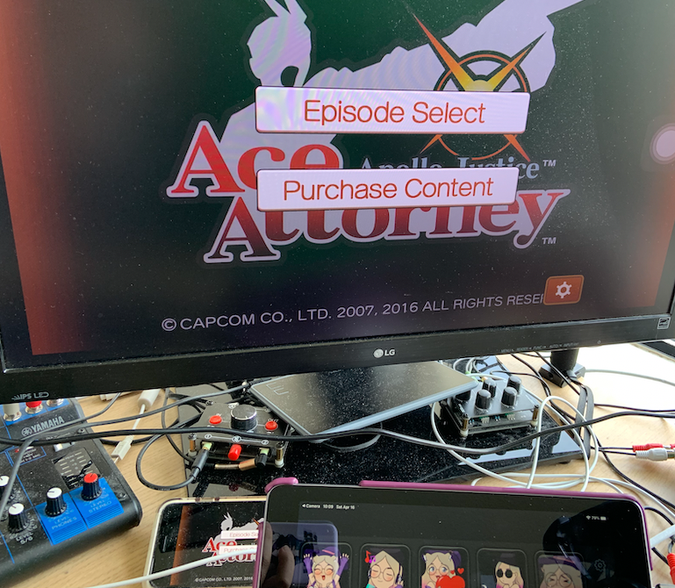
I’ve been working through playing all of the Ace Attorney games with having completed Ace Attorney Investigations: Miles Edgeworth just yesterday. About a third of them required me to use an iPhone to play based on some silly standard I have for my Twitch stream. So let’s talk about this!
What games are on mobile?
As it stands, this is a list of the games that required me to use an iPhone in order to play:
- Apollo Justice: Ace Attorney
- Phoenix Wright: Ace Attorney – Dual Destinies
- Phoenix Wright: Ace Attorney – Spirit of Justice
- Ace Attorney Investigations: Miles Edgeworth
The sequel to the last one, Ace Attorney Investigations 2 is available for iOS, but unlike its predecessor, it has never been translated into English. A patch for its DS release is available and there were efforts to bring the patch to Android, but it hasn’t had an update since late-last year.
I bought a copy of the game and have already dumped the game and patched it already! It is likely I’ll write about how easy it was to dump my cartridge and do all this work myself sometime soon.
The first three in that list are available on 3DS and Investigations was on DS (Apollo Justice is on both). However, the 3DS and DS have resolutions that make the content appear pixelated and even though I stream at 720p60, I notice this. Additionally, I don’t have a capture-able 3DS and must resort to emulation such as the case with Layton vs. Wright.
So the iPhone version is the option I chose. Namely it’s because I am a heavy user of the Apple ecosystem and I have an iPhone 8 I don’t use much any more. Additionally, the games run at an HD resolution so downscaling them doesn’t end up looking bad.
Hardware and why AirPlay is not an option
To stream an iOS device, you can use an official lightning to HDMI adapter. This provides both an HDMI output and an additional lightning port so you can keep the phone charged.
This works really well and is plug and play. My capture card had no issues with the video output and while I did need to trim the unused space, it wasn’t at all a problem.
One problem with this arrangement is since the device is attached via a dongle with ah HDMI and power cord attached to that, my hands lose a lot of mobility with one side of the device being pulled down in a rather uncomfortable manner.
So you’re then thinking: why not use AirPlay? That way I can just charge the phone after the stream or just have one cable attached to it as opposed to two. This idea is great on paper, but testing it unfortunately led to problems.
With Dual Destinies and Spirit of Justice in particular, the majority of the game content is 2D, but the moment you end up in 3D, AirPlay becomes a real nightmare. I have an Apple TV attached to my streaming set up, but the moment you encounter anything with 3D is when AirPlay just struggles. The frame rate from the game content becomes no better than a slideshow and there is not much I can do about it.
This problem is either a limitation of AirPlay or with using wireless networking (the Apple TV is attached via ethernet), but nonetheless it is not ideal.
Two games will refuse to run without a trick
Both Apollo Justice and Investigations share two things in common: the games are presented in a 4:3 aspect ratio and they both hate the HDMI connection.
When I would launch either game, it would show the game’s logo and then immediately crash. This was super confusing as the problem did not exhibit itself on my iPad or my iPhone XR. All of my devices are running the same version of iOS and the XR and iPad both have wildly different resolutions, so I was super confused to why the iPhone 8 was so special.
It wasn’t until when I was trying out things on my iPhone did I conclude the problem: it only happened when the dongle was attached. Sure enough when I launched the game with no tethering the game launch. If I killed the game, attached the dongle back in, and then launched again, it would crash.
The trick to fixing this was simple: launch the game and then attach the dongle. I have no idea why these two games in particular hated the attachment, but after launch they didn’t seem to care and I was able to move on.
I wish these games worked on my M1
There is no reason for why Capcom doesn’t permit these games on macOS. They’d run natively on my M1 MacBook Pro just fine, but alas.
That will be all 11 Ace Attorney games done in less than a year! I also plan to play Ghost Trick!